 Posted by
 Two retirement clocks are ticking right now, and if you’re running anything on Azure Cache for Redis, both of them are pointed at you.
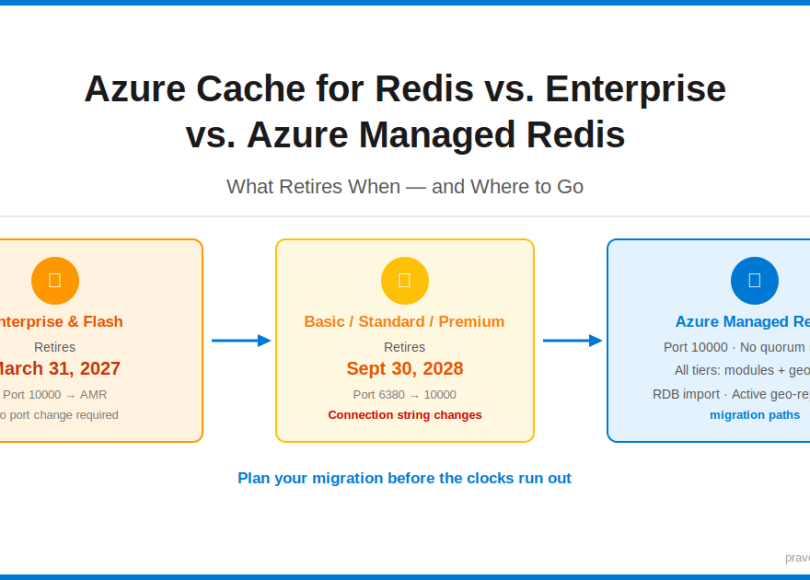
Microsoft has announced the retirement of Azure Cache for Redis Enterprise and Enterprise Flash on March 31, 2027 — and the retirement of Azure Cache for Redis (Basic, Standard, and Premium tiers) on September 30, 2028. The replacement for both: Azure Managed Redis (AMR).
This is not a minor update. Migrating to AMR involves a port change, a quorum architecture change, and a different SDK connection string. If you’re building or studying AI-powered solutions on Azure, more importantly, it’s about to matter in production.
What Is Azure Managed Redis?
Azure Managed Redis is Microsoft’s next-generation, fully managed Redis offering built on top of Redis Software (the commercial distribution from Redis Ltd., not the open-source fork). It replaces the entire existing Azure Cache for Redis product family with a unified tier structure designed for higher throughput, lower latency, and production-grade HA without the operational overhead.
AMR introduces four new tiers:
- Memory Optimized — high memory-to-vCore ratio, ideal for caching large datasets
- Balanced — general-purpose cache workloads
- Compute Optimized — low-latency, throughput-intensive workloads
- Flash Optimized — extends memory to NVMe SSD for cost-effective large-scale caching
Every tier supports active geo-replication, clustering, TLS, and Redis modules (RediSearch, RedisJSON, RedisTimeSeries) — features that were previously locked to the Enterprise tier.
The Retirement Timeline — Both Clocks at a Glance
| Product | Tier(s) Affected | Retirement Date | Replacement |
| Azure Cache for Redis — Enterprise & Enterprise Flash | Enterprise, Enterprise Flash | March 31, 2027 | Azure Managed Redis |
| Azure Cache for Redis — Standard family | Basic, Standard, Premium | September 30, 2028 | Azure Managed Redis |
Side-by-Side Comparison: Azure Cache for Redis vs. Azure Managed Redis
| Feature | Azure Cache for Redis (Current) | Azure Managed Redis (AMR) |
| Underlying distribution | Open-source Redis (OSS) | Redis Software (commercial) |
| Port for TLS connections | 6380 (non-Enterprise) / 10000 (Enterprise) | 10000 |
| Quorum / sentinel nodes | Yes — quorum nodes count toward cost | No quorum nodes — eliminated by design |
| Clustering support | Premium and Enterprise tiers only | All tiers (except Flash Optimized has no non-clustered option) |
| Active geo-replication | Enterprise tier only | Memory Optimized, Balanced (except B0/B1), and Compute Optimized — not Flash Optimized |
| Redis modules (RediSearch, RedisJSON, etc.) | Enterprise tier only | All tiers — note: Search/vector search not available on Flash Optimized |
| Availability zones | Premium and Enterprise tiers | All tiers |
| Max memory per instance | Up to 1.2 TB (Enterprise Flash) | Up to 4.5 TB (Flash Optimized) |
| SLA | Up to 99.9% (Premium / Enterprise) | 99.9% on all tiers; 99.99% with zone redundancy |
| OSS Cluster API compatibility | Supported (Enterprise) | Supported |
The Port 6380 vs. 10000 Gotcha — This Will Break Your Connection String
This is the most common migration pitfall and the one most likely to cause a silent production failure.
Azure Cache for Redis (Basic, Standard, Premium) uses port 6380 for TLS connections. Azure Cache for Redis Enterprise used port 10000. Azure Managed Redis standardizes on port 10000 across all tiers.
That means:
- If you’re migrating from Basic/Standard/Premium, you must update your connection strings from port 6380 to port 10000.
- If you’re migrating from Enterprise, your port is already 10000 — no change needed.
- Any hardcoded port in app config, Key Vault secrets, or appsettings.json needs to be updated before cutover.
StackExchange.Redis example — old connection string (Basic/Standard/Premium):
mycache.redis.cache.windows.net:6380,password=<key>,ssl=True,abortConnect=False
New connection string for Azure Managed Redis:
mycache.eastus.redis.azure.net:10000,password=<key>,ssl=True,abortConnect=False
The hostname format also changes: AMR uses a regional endpoint pattern (*.eastus.redis.azure.net) rather than the flat *.redis.cache.windows.net pattern. Both the host and port in your connection string will change if you’re migrating from Basic/Standard/Premium.
Why AMR Removes the Quorum Node
In Azure Cache for Redis Premium and Enterprise, high availability is managed through Redis Sentinel — a separate process that monitors primary/replica pairs and performs automatic failover. Sentinel requires an odd number of nodes to achieve quorum. This meant you were paying for quorum nodes that serve no data — they exist solely for HA coordination.
Azure Managed Redis eliminates this architecture entirely. AMR uses a built-in HA model that doesn’t require external sentinel processes or dedicated quorum nodes. High availability is managed at the infrastructure level, not the Redis process level.
The practical result:
- You pay only for nodes that serve data
- Failover is still automatic and transparent to the application
- Zone-redundant deployments are supported without quorum overhead
- Cluster topologies are simpler to reason about
Migration Options — How to Move
Microsoft provides two migration options for both source tiers. The options are the same in concept but differ in specific capabilities and limitations depending on your source. Option 1 (Self-service) is recommended by Microsoft for most customers.
Option 1: Self-Service Migration (Recommended)
Applies to: Basic, Standard, Premium, and Enterprise tiers. You provision a new AMR instance, migrate your data using a strategy of your choice (dual-write, export/import, or RIOT), update your applications to point to the new instance, then decommission the old cache.
- Full control: You decide exactly when to cut over and can test before switching production traffic. Multiple apps sharing one Redis instance can be migrated one at a time.
- Minimal downtime: Use a data sync strategy (dual-write, export/import, or RIOT) to keep both caches running in parallel and cut over with minimal disruption.
- Independent validation: Verify the new AMR instance works correctly before decommissioning the old cache.
- Works with geo-replicated caches (Enterprise only): Add an AMR instance to the geo-replication group one at a time and remove the Enterprise instances progressively, maintaining geo-replication throughout.
Official docs: Basic/Standard/Premium → learn.microsoft.com/en-us/azure/redis/migrate/migrate-basic-standard-premium-self-service
Official docs: Enterprise → learn.microsoft.com/en-us/azure/redis/migrate/migrate-redis-enterprise-self-service
Option 2: Migration Using Tooling (Preview for Basic/Standard/Premium)
Azure provides built-in migration tooling that automates endpoint migration from your existing cache to a pre-created AMR instance. The tooling updates your old hostname to point to AMR so client applications reconnect automatically using the same hostname and access key.
- No data migration: The tooling handles hostname/endpoint cutover only — it does not migrate data.
- All apps cut over simultaneously: You cannot migrate one application at a time.
- No cutover control: You initiate migration but cannot control the exact moment of traffic cutover.
- No rollback after completion (Enterprise): Once migration completes on Enterprise, it cannot be paused, cancelled, or rolled back. Basic/Standard/Premium tooling offers a limited rollback window.
- Unsupported configurations: Private endpoints, VNet-injected caches, and geo-replicated caches are not supported by either tooling path.
Official docs: Basic/Standard/Premium → learn.microsoft.com/en-us/azure/redis/migrate/migrate-basic-standard-premium-with-tooling
Official docs: Enterprise → learn.microsoft.com/en-us/azure/redis/migrate/migrate-redis-enterprise-with-tooling
Key Exam Takeaways
| Concept | What to Remember |
| Enterprise retirement date | March 31, 2027 |
| Basic/Standard/Premium retirement date | September 30, 2028 |
| AMR replaces | All Azure Cache for Redis tiers |
| Port change for Basic/Standard/Premium | 6380 → 10000 |
| Port for Enterprise migration | 10000 → 10000 (no change) |
| Quorum nodes in AMR | Eliminated — HA is infrastructure-managed |
| Recommended migration option | Option 1: Self-service migration (both source tiers) |
| Redis modules (RediSearch, RedisJSON) | Available on all AMR tiers (was Enterprise-only) |
| Hostname pattern change | *.redis.cache.windows.net → *.eastus.redis.azure.net |
Don’t wait until 2028 to start this process. The September 2028 deadline will drive a wave of concurrent migrations — provisioning quotas, support response times, and internal review cycles all get slower when every team is migrating at once.
Conclusion
The Azure Cache for Redis retirement isn’t a distant problem — it’s a migration project you should already have on your backlog. The two key dates (March 2027 for Enterprise, September 2028 for Basic/Standard/Premium) define your planning horizon. Azure Managed Redis is the unified destination: a cleaner architecture, no quorum node overhead, Redis modules on every tier, and a standardized port of 10000.
For the exam: know the retirement dates, know the port change (6380 → 10000 for Basic/Standard/Premium), know why quorum nodes are gone, and know which migration path gives you near-zero downtime.
This article is part of the AI-200: Developing AI Cloud Solutions on Azure certification series.
Do you like this article? If you want to get more updates about these kind of articles, you can join my Learning Groups
Discover more from Praveen Kumar Sreeram's Blog
Subscribe to get the latest posts sent to your email.
