 Posted by
 The Problem Every Application Eventually Hits
Every application has the same conversation at some point: the database is slow, the page load is not good, and the users are getting performance issue. The immediate solution that people take is to provision more compute at the problem — bigger VMs, more replicas, a faster query engine. But in most cases, the real fix is much simpler: stop going to the database for data you already retrieved five minutes ago in some cases.
Azure Managed Redis is Microsoft’s fully managed in-memory data store built on Redis Enterprise. It supports a handful of application architecture patterns that, together, eliminate the majority of avoidable latency in cloud applications.
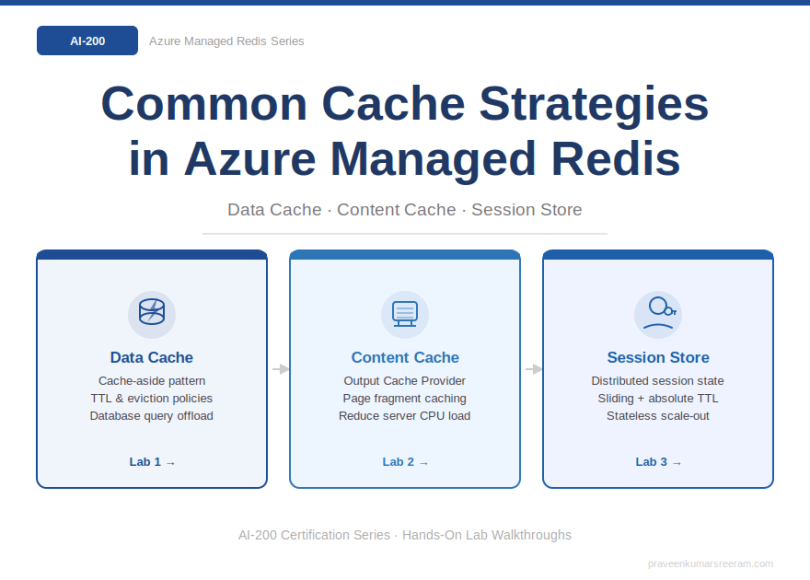
- Data Cache — keep frequently queried database results in memory
- Content Cache — serve static page fragments without hitting the backend
- Session Store — replace cookie-bloated or database-backed user sessions
What Is Azure Managed Redis?
Azure Managed Redis is an in-memory data store hosted and operated by Microsoft on Azure infrastructure. It is built on Redis Enterprise software, which extends open-source Redis with higher performance, improved reliability, and enterprise-grade features — while remaining wire-compatible with standard Redis clients.
Four tiers are available — Memory Optimized, Balanced, Compute Optimized, and Flash Optimized — each tuned for different memory-to-vCPU ratios and workload profiles. The right tier depends on whether your bottleneck is memory volume, throughput, or cost per GB.
Strategy 1: Data Cache
What It Is
A data cache stores the results of expensive database queries in Redis so that subsequent requests retrieve the same data from memory in sub-millisecond time rather than re-querying the database. The canonical implementation is the cache-aside pattern (also called lazy loading):
- The application checks Redis for the requested data.
- If the data is present (cache hit), it is returned immediately.
- If the data is absent (cache miss), the application queries the database, stores the result in Redis with a TTL, and returns it to the caller.
The TTL (time-to-live) controls staleness. When data changes in the database, the application can either wait for the TTL to expire (acceptable for read-heavy, low-change data) or actively invalidate the cache key (for tighter consistency requirements).
Old way (without Redis): Every request hits Azure SQL or Cosmos DB directly. Under load, query concurrency rises, connection pool exhausts, latency spikes.
New way (with Redis): First request pays the database cost. All subsequent requests (until TTL expires) hit Redis at < 1 ms. Database load drops by the cache hit ratio — often 80–95 % for read-heavy workloads.
Core Concepts
Cache Hit Rate — The percentage of requests satisfied by the cache. A hit rate above 90 % is the typical target for production data caches.
TTL (Time-to-Live) — Expiry set on each key. Short TTLs maintain freshness but increase cache miss rate. Long TTLs improve hit rate but risk serving stale data.
Eviction Policy — Redis policy that governs which keys are removed when memory is full. Common policies include allkeys-lru (evict least-recently-used across all keys) and volatile-lru (evict only keys with a TTL set).
Cache Invalidation — Explicitly removing a key from cache when the underlying data changes, rather than waiting for TTL expiry. Keeps data fresh at the cost of more application logic.
When to Use It
- Read-heavy workloads where the same query is repeated by many users.
- Data that does not change on every request (product catalogs, pricing data, reference tables, recommendation results).
- Backend databases approaching connection or throughput limits.
- Multi-tenant SaaS applications where per-tenant configuration is queried on every API call.
Hands-On Lab
The companion lab walks through building a cache-aside implementation using Azure Managed Redis and Azure SQL. You will provision the Redis instance, connect from an ASP.NET Core application, instrument cache hits and misses with Application Insights, and observe the latency delta in real time.
→ Lab 1: Implementing the Cache-Aside Pattern with Azure Managed Redis (link will be updated when the lab is published)
Strategy 2: Content Cache
What It Is
A content cache stores rendered or semi-rendered page fragments, API responses, or static assets in Redis so that repeated requests for the same content do not require re-processing by the web server or re-fetching from a backend data store.
Many web pages are assembled from templates that include headers, footers, navigation menus, promotional banners, and sidebar widgets. These elements rarely change. Without caching, every page request triggers database queries and server-side rendering for content that was identical on the last ten thousand requests.
Azure Managed Redis provides the Redis Output Cache Provider specifically to support this pattern with ASP.NET and ASP.NET Core applications. It intercepts HTTP responses at the framework level and stores the rendered output in Redis, keyed by URL and query parameters.
Why It Matters for the Exam
Content cache questions on AI-200 typically present a web application under read load where server CPU is the bottleneck — not database queries. The signal is page rendering cost, not query latency. Content caching moves work off the web server: instead of rendering, the server reads a pre-rendered response from Redis and returns it directly.
The exam also expects you to understand the difference between content cache and a CDN. A CDN caches at the network edge for geographic distribution. A content cache (Redis) caches at the application tier for reducing server-side rendering cost. In many production architectures, both are used together.
| Old way: Each request triggers template resolution, database lookups for header/footer/navigation content, server-side rendering, and response serialization. Under load, web server CPU saturates. New way: First request renders and stores the output in Redis with a TTL. Subsequent requests return the cached response in microseconds. Server CPU drops to near zero for those routes. |
Core Concepts
Output Caching — Caching the final HTTP response rather than individual data objects. Coarser-grained than data caching but reduces more server work per request.
Fragment Caching — Caching individual page fragments (header, footer, sidebar) independently, with different TTLs per fragment. Allows partial freshness control.
Cache Key Design — Content cache keys must capture all dimensions that produce different output: URL, query string, user locale, A/B test variant, device type. A poorly designed key either serves the wrong content or creates too many unique keys to cache effectively.
Redis Output Cache Provider — The ASP.NET integration library that handles cache key generation, serialization, TTL management, and conditional bypass for authenticated or personalised routes.
When to Use It
- Public-facing pages with high read traffic and low update frequency (news sites, e-commerce category pages, marketing landing pages).
- API endpoints returning reference data consumed by multiple front-end clients.
- Web applications where server CPU is the bottleneck, not the database.
- Multi-region deployments where active geo-replication propagates cached content globally.
What Not to Cache
- Pages that contain personalised or user-specific content (unless you vary the cache key by user, which dramatically reduces hit rate).
- Responses to authenticated POST, PUT, or DELETE requests.
- Content that changes more frequently than the minimum acceptable TTL.
Hands-On Lab
The companion lab provisions an Azure Managed Redis instance, configures the ASP.NET Core Output Cache provider to use Redis as the backing store, and demonstrates the rendering cost difference with and without caching under simulated load using Azure Load Testing.
→ Lab 2: Implementing Content Cache with the Redis Output Cache Provider (link will be updated when the lab is published)
Strategy 3: Session Store
What It Is
A session store replaces the default server-side or cookie-based session storage in web applications with a centralized, in-memory store shared across all application instances. Azure Managed Redis is used as that centralized store.
In a stateless, horizontally scaled web application, each request may be handled by a different server instance. If session data is stored locally on each server, users will lose their session when they are routed to a different instance — a classic sticky session problem. Storing sessions in Redis decouples session state from individual servers, enabling true stateless scale-out.
The typical pattern is: a lightweight cookie holds only a session ID (a key). The application uses that key to retrieve the session object from Redis. The session object — shopping cart contents, user preferences, authentication claims, workflow state — lives in Redis with a sliding expiration TTL that resets on every access.
Why It Matters for the Exam
Session store scenarios appear on AI-200 in the context of scale-out and availability. The exam tests whether you understand that storing session state in application memory causes sticky session requirements, which limits horizontal scaling and breaks in failover scenarios. Redis session store is the solution that eliminates sticky session dependency.
The Microsoft documentation for Azure Managed Redis states the tradeoff explicitly: a cookie grows with each additional piece of session data, and that size is transmitted and validated on every single request. Redis solves this by keeping the payload on the server side — the cookie stays a small fixed-size key.
| Old way: Session stored in application server memory. Requires sticky sessions (load balancer affinity). Server restart or scale-in event loses all active sessions. Cookie size grows with session payload. New way: Session stored in Redis. All application instances share the same session store. Load balancer can route freely without affinity. Scale out adds instances without session migration. Cookie stays small. |
Core Concepts
Sliding Expiration — The session TTL resets on every read or write. A session remains alive as long as the user is active. An inactive session expires after the configured idle timeout.
Absolute Expiration — A hard maximum TTL regardless of activity. Prevents sessions from living indefinitely even if a user keeps a tab open for weeks.
Session Key Design — Sessions are typically keyed by a GUID session ID. Keys should be namespaced to avoid collisions if multiple applications share the same Redis instance (e.g., app1:session:<guid>).
Data Serialization — Session objects must be serialized for storage in Redis. JSON is the most portable format; custom binary formats reduce storage footprint but increase coupling.
Sticky Sessions vs. Shared State — Sticky sessions (load balancer affinity) are a workaround for in-memory session storage, not a solution. Redis session store eliminates the need for sticky sessions entirely.
When to Use It
- Any horizontally scaled web application that maintains user state across requests.
- E-commerce applications with shopping carts, checkout flows, and user preferences.
- Multi-step wizard or form flows where state must persist between steps.
- Applications that need to survive individual instance failures without losing user sessions.
- Microservice architectures where multiple services need to read the same session context.
Hands-On Lab
The companion lab provisions Azure Managed Redis, configures ASP.NET Core to use the Redis distributed session provider, demonstrates the sticky session failure mode with in-memory sessions, and shows that the Redis-backed version survives instance restarts without session loss.
→ Lab 3: Distributed Session Store with Azure Managed Redis (link will be updated when the lab is published)
Key Exam Takeaways
| Concept | What to Remember |
| Cache-aside pattern | Application code manages cache reads and writes. Cache is loaded on demand (lazy). TTL controls staleness. Best for read-heavy, infrequently changing data. |
| Content cache | Caches rendered HTTP responses or page fragments. Reduces server-side rendering cost. Redis Output Cache Provider is the ASP.NET integration. Different from a CDN. |
| Session store | Centralises user session state across all application instances. Eliminates sticky session requirement. Uses sliding + absolute expiration. Cookie holds only a session ID key. |
| Cache hit rate | The primary metric for cache effectiveness. Higher hit rates mean more load deflected from the backend. Target > 90 % for well-designed data caches. |
| Eviction policy | Governs which keys are removed when memory is full. allkeys-lru is the most common production policy. Set based on workload access patterns. |
| TTL design | Short TTLs favour freshness; long TTLs favour hit rate. Sliding TTL resets on access (sessions). Absolute TTL provides a hard expiry ceiling. |
| Redis vs. CDN | Redis caches at the application tier (server-side rendering cost). CDN caches at the network edge (geographic distribution). Most high-traffic sites use both. |
| Scale-out scenario | When a scenario describes HTTP session loss during scale-out or instance failover, the answer is always Redis-backed distributed session store. |
| Tier selection | Memory Optimized: large datasets, lower throughput. Balanced: standard workloads. Compute Optimized: maximum throughput. Flash Optimized: cost-effective very large datasets. |
Practical Scenario: E-Commerce Platform Under Black Friday Load
You are the solution architect for an e-commerce platform expecting 50× normal traffic during a promotional event. The current architecture uses Azure SQL for product data, server-side session storage for shopping carts, and no page-level caching.
Apply all three cache strategies:
| Data Cache — Product Catalog | |
| Problem | Product detail pages query Azure SQL on every request. Under 50× load, query concurrency exhausts the connection pool. |
| Solution | Cache-aside pattern on product data with a 15-minute TTL. Product catalog rarely changes mid-promotion. Cache hit rate targets > 95 %. |
| Result | Database query volume drops from 50× to ~1× (only cache misses and TTL refreshes hit the DB). |
| Content Cache — Category and Landing Pages | |
| Problem | Category pages render navigation, promotions, and product grids server-side on every request. Web server CPU saturates. |
| Solution | Redis Output Cache Provider caches rendered category page responses with a 5-minute TTL. Promotional banner fragments cached separately with a 1-minute TTL. |
| Result | Server CPU drops by 80 %. Instances that were CPU-bound can now handle 5× more concurrent requests. |
| Session Store — Shopping Carts | |
| Problem | In-memory sessions require sticky sessions. During auto-scale events, new instances cannot serve existing users’ carts. Instance replacement (patching, crash) drops carts. |
| Solution | Azure Managed Redis session store. All instances share the same cart state. Load balancer removes sticky session affinity. Sliding TTL of 30 minutes; absolute TTL of 24 hours. |
| Result | Zero session loss during scale-out events. Checkout completion rate improves because users no longer lose their cart on instance failover. |
Conclusion
Data cache, content cache, and session store are the three foundational Redis patterns that appear on the AI-200 exam. They are not interchangeable — each solves a different bottleneck:
- Data cache deflects database query load using the cache-aside pattern.
- Content cache reduces server-side rendering cost using the Redis Output Cache Provider.
- Session store enables stateless horizontal scaling by centralising user session state.
Understanding which pattern applies to which scenario is the difference between a passing and a failing answer on the exam. The hands-on labs linked from each section above build each pattern from scratch, giving you the muscle memory to reason through scenario questions confidently.
This article is part of the AI-200: Developing AI Cloud Solutions on Azure certification series.
Do you like this article? If you want to get more updates about these kind of articles, you can join my Learning Groups
Discover more from Praveen Kumar Sreeram's Blog
Subscribe to get the latest posts sent to your email.
