 Posted by
 What is Azure HorizonDB?
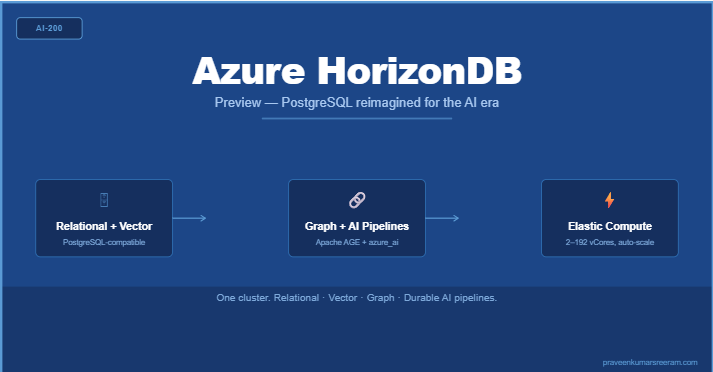
Your relational database is also your vector store, your graph store, and your AI pipeline runtime — and it does all of this at cloud scale. That is the core promise of Azure HorizonDB (Preview), Microsoft’s newest fully managed PostgreSQL-based data platform built for modern AI workloads.
Developers building on Azure today often end up stitching together multiple services: a relational DB for structured data, a separate vector store for embeddings, a graph database for relationship queries, and yet another service to orchestrate AI pipelines. Azure HorizonDB collapses those into a single cluster backed by auto-scaling shared storage and a stateless compute layer.
| 💡 Azure HorizonDB is currently in Public Preview. APIs, features, and pricing are subject to change before general availability. Do not use it for production workloads without evaluating the preview terms. |
Creating an Azure HorizonDB Cluster
Navigate to the Azure Portal, search for Azure HorizonDB, and select Create an Azure HorizonDB (Preview). The creation wizard presents four tabs: Basics, Networking, Security, and Tags.
Step 1: Basics Tab
Fill in the Project details and Cluster details sections as shown below.
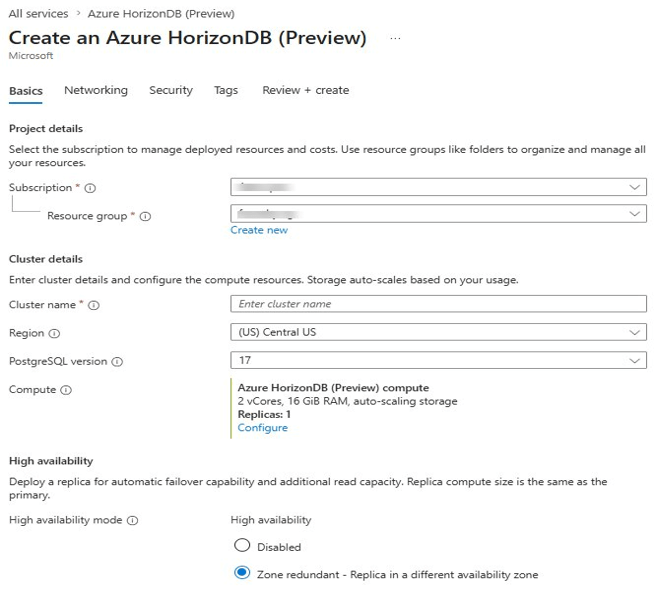
Key fields to configure:
- Cluster name — unique within the resource group.
- Region — choose the Azure region closest to your workload. Not all regions support HorizonDB in Preview.
- PostgreSQL version — version 17 is the default and currently the only option in Preview.
- Compute — defaults to 2 vCores, 16 GiB RAM with auto-scaling storage. Click Configure to change this.
- High availability mode — choose Disabled or Zone redundant (recommended for resilience). Zone redundant places a standby replica in a different availability zone.
Step 2: Configuring Compute
Clicking Configure under Compute opens the Compute panel. Here you set vCores, memory, and replica options.
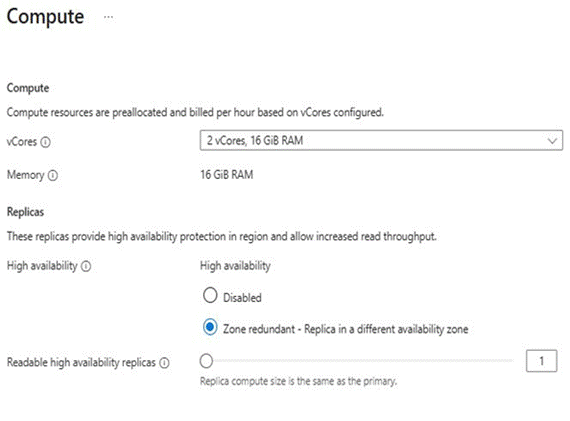
Figure 2: Compute panel — vCores set to 2 vCores / 16 GiB RAM, High availability set to Zone redundant
Memory is fixed at 8 GiB per vCore — you cannot configure it independently. The available vCore tiers are shown below.
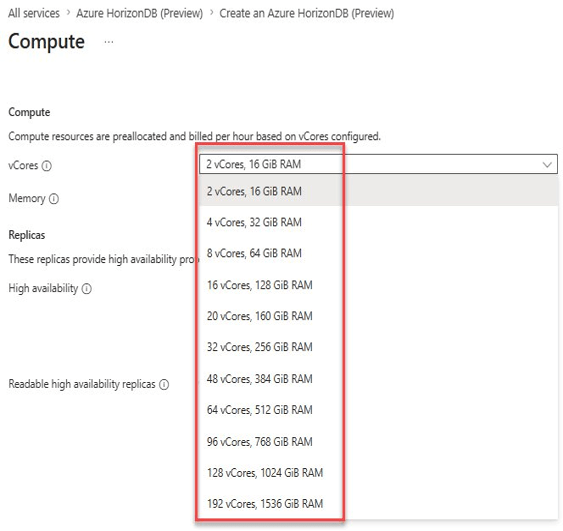
Available compute tiers in Preview:
- 2 vCores — 16 GiB RAM (minimum, default)
- 4 vCores — 32 GiB RAM
- 8 vCores — 64 GiB RAM
- 16 vCores — 128 GiB RAM
- 20 vCores — 160 GiB RAM
- 32 vCores — 256 GiB RAM
- 48 vCores — 384 GiB RAM
- 64 vCores — 512 GiB RAM
- 96 vCores — 768 GiB RAM
- 128 vCores — 1,024 GiB RAM
- 192 vCores — 1,536 GiB RAM
| 💡 Compute resources are pre-allocated and billed per hour based on vCores configured. Storage auto-scales separately — you pay only for what you use. |
Step 3: Networking, Security, and Tags
These tabs follow the standard Azure patterns. Configure VNet integration or public access under Networking. Security lets you set the PostgreSQL admin username and password. Tags are optional metadata for billing and governance. Once configured, select Review + create and deploy.
Compute Replicas: Vertical and Horizontal Scaling
Every Azure HorizonDB cluster is built around a shared-storage architecture. Compute replicas are stateless PostgreSQL engines that connect to a shared storage layer. Because storage is decoupled, you can scale compute up or out without moving data.
What is a Compute Replica?
A compute replica is the layer where the PostgreSQL engine runs — query parsing, transaction management, execution. Each replica has its own local NVMe SSD cache for hot pages, reducing round trips to the remote storage layer.
Every cluster has one Primary replica (read-write) and optionally one or more Standby replicas (read-only, also serve as failover candidates).
Vertical Scaling (Scale Up)
Scale up increases vCores and memory on every replica in the cluster simultaneously. Use this when workloads need more processing power — complex queries, large joins, high connection counts, or sustained high CPU utilisation.
How it works: HorizonDB restarts all replicas with the new configuration. The database is temporarily unavailable during the restart, and existing connections are dropped. The service brings everything back online automatically once the new configuration is applied.
When to scale up:
- Sustained high CPU utilisation across replicas.
- Memory pressure causing excessive page evictions from the shared buffer pool.
- Query performance degradation on complex, large queries.
Horizontal Scaling (Scale Out — Read Replicas)
Scale out adds more standby replicas to distribute read traffic. An Azure HorizonDB cluster supports up to 15 readable replicas in addition to the primary.
Because all replicas share the same underlying storage, provisioning a new replica does not involve copying data or setting up streaming replication. The new replica connects to shared storage and starts serving reads almost immediately.
When to scale out:
- Read-heavy workloads that are saturating the primary.
- Reporting or analytics queries that need to be isolated from OLTP traffic.
- Increased availability by placing failover candidates in different availability zones.
Read-only endpoint: HorizonDB provides a dedicated read-only endpoint that automatically load-balances across all standby replicas. Use the read-write endpoint for writes and for reads requiring the latest committed data.
| Topic | Key Point |
| Scale Up | Restarts replicas; brief downtime. Increases vCores and memory proportionally (8 GiB per vCore). |
| Scale Out | No downtime for the existing cluster. Adds standby replicas up to a maximum of 15. |
| Shared Storage | All replicas read from the same storage layer — no data copy required when adding a replica. |
| Read Endpoint | Dedicated endpoint auto-load-balances across all standby replicas. |
| HA Requirement | Zone-redundant HA requires at least one primary + one standby in different availability zones. |
Graph Database Support via Apache AGE
Azure HorizonDB includes Apache AGE (A Graph Extension) — a PostgreSQL extension developed under the Apache Incubator project. It brings graph database capabilities directly into the relational engine, letting you model, store, and query highly connected data without leaving PostgreSQL.
Why a Graph Database?
Relational databases require multiple joins to traverse relationships. Graph databases model entities as nodes and relationships as edges, making queries like ‘friends of friends’ or ‘shortest path’ natural and efficient. Typical use cases include social networks, fraud detection, recommendation engines, and knowledge graphs for AI-driven search.
Durable AI Pipelines
Traditional RAG (Retrieval-Augmented Generation) architectures involve an application-tier service that reads rows, calls an embedding API, and writes vectors back to the database. This pattern has well-known failure modes: lost checkpoints on crashes, partial writes on transient API failures, no clean path to re-embed when models change.
Azure HorizonDB’s AI pipelines move that logic into the database itself. The pipeline definition is a SQL object. Execution is durable: it survives crashes, retries failed steps automatically, and resumes from the last completed step after a restart.
Pipeline Anatomy
An AI pipeline has four parts:
- Source — the table rows to process, optionally filtered by an incremental_column to skip already-processed rows.
- Steps — the AI operations applied in sequence. Each step appends columns to the in-flight batch.
- Sink (optional) — the output table where results are written.
- Trigger — on_change (runs automatically when source rows change) or manual (runs only on explicit ai.run() call).
What to Explore Next
This article covered the essentials of getting started with Azure HorizonDB in Preview: creating a cluster, understanding compute scaling options, enabling graph capabilities with Apache AGE, and building durable AI pipelines with the azure_ai extension. Each of these is a deep topic in its own right.
Upcoming articles in this series will go deeper on each area:
- Compute Replicas — hands-on walkthrough of vertical and horizontal scaling with CLI commands.
- Graph DB with Apache AGE — building a real knowledge graph and querying it with openCypher.
- AI Pipelines — end-to-end RAG pipeline build with DiskANN vector indexing and hybrid search.
Do you like this article? If you want to get more updates about these kind of articles, you can join my Learning Groups
Discover more from Praveen Kumar Sreeram's Blog
Subscribe to get the latest posts sent to your email.
