Skip to content

Praveen Kumar Sreeram's Blog

Azure for developers

  • Home
  • Azure
  • Azure Data FActory
  • Azure Functions
  • Application Insights
  • Trainings
    • Azure Administration with DevOps
    • Azure DevOps – Online Training
    • Azure for Developers (Az-204)
    • Azure for Administrators (Az-104)
    • Azure for Data Engineers
    • Azure Data Factory
    • Learn Terraform with Azure
  • Azure Interview Questions
  • Azure DevOps
  • About
    • Contact
  • Microsoft Azure – Tips
December 28, 2016 Azure

Azure Storage Create Container Programmatically using C#.Net Storage Client Library

Praveen Kumar Sreeram's avatarPosted by Praveen Kumar Sreeram

Please go through the following articles to learn more about Storage Account.

  • Azure Storage – Basics
  • Azure Resource Manage Template: Create A Storage Account Using Blank Template
  • Create a Storage Account and learn how to access It Programmatically

What is Blob Container?

Container is a collection that could be used like a folder for storing the Blobs.

Below are the steps required for creating a Container using .NET Storage Client Library.

Advertisements
  • Download and Install Storage from Nuget Package Library – A Client library for working with Microsoft Azure storage services like Blobs, Files and Queues.
  • Build a Connection String to the Storage Account’s End point using Storage Account Access Keys
  • Programmatically Connect to the Storage Account and create the Storage Container.

For this example, I have created a Console Application that creates a Container in the selected Storage Account.

Add the WindowsAzure.Storage Nuget Package from Nuget.

0_storagenugetpackage

Below are the highlighted references that gets added as soon as I installed the above Package.

Advertisements
1_consoleapplication

The next thing is to have the Connection String for the Storage Account. Grab the Connection String from the Access Keys blade from the Storage Account which was explained in our previous articles Create a Storage Account and learn how to access It Programmatically

Advertisements

Create an AppSetting key in the App.Config to store the ConnetionString as shown below.

<?xml version=”1.0″ encoding=”utf-8″ ?>
<configuration>
<startup>
<supportedRuntime version=”v4.0″ sku=”.NETFramework,Version=v4.6.1″ />
</startup>
<appSettings>
<add key=”ConnectionString” value=”DefaultEndpointsProtocol=https;AccountName=<StorageAccountname>;AccountKey=<Key>;”/>
</appSettings>
</configuration>

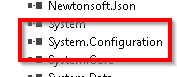
Please also add System.Configuration reference to the application as shown below. This is required for accessing the App.Config App Settings keys.
3_configurationmanager

In order to connect to Azure Storage services, we need to include the following namespaces.

using Microsoft.WindowsAzure.Storage;
using Microsoft.WindowsAzure.Storage.Blob;

Write the following code in the Main method as shown below. Please note that you should encapsulate the below in a separate class. The below code is used for demonstration.

Advertisements

  //Get the reference of the Storage Account

CloudStorageAccount storageaccount = CloudStorageAccount.Parse(ConfigurationManager.AppSettings[“ConnectionString”].ToString());

//Get the reference of the Storage Blob
CloudBlobClient client = storageaccount.CreateCloudBlobClient();

/*Get the reference of the Container. The GetConainerReference doesn’t make a request to the Blob Storage but the Create() & CreateIfNotExists() method does. The method CreateIfNotExists() could be use whether the Container exists or not*/
CloudBlobContainer container = client.GetContainerReference(“images”);      container.CreateIfNotExists();

Don’t execute the code yet. Let’s have a look at the containers blade which is shown below.

4_containerslisting

As shown in the above screen capture, we don’t have any Containers yet in our storage account. Let’s create the new container named ‘pdfs’ by executing the code that we have just developed.

Advertisements

Execute the Console application by pressing Ctrl + F5.

5_output

The program got executed successfully. Let’s navigate to the Storage Account Container’s blade and refresh the same to view the new Container which is shown below.

6_containerlisting
Advertisements

That’s it. We have successfully created the Azure Storage Container.

Summary: We have learnt the following in this article.

  • About a Container
  • How to create a reference to a Storage Account using Storage Client Library
  • Get a reference to a Container and create it if doesn’t exist yet.

Hope you enjoyed reading the article. Your feedback is appreciated.

Do you like this article? If you want to get more updates about these kind of articles, you can join my Learning Groups

WhatsApp

Telegram

Advertisements
Advertisements
Advertisements

Share this:

  • Click to share on X (Opens in new window) X
  • Click to share on Facebook (Opens in new window) Facebook
  • Click to share on Reddit (Opens in new window) Reddit
  • Click to share on WhatsApp (Opens in new window) WhatsApp
  • Click to share on Pinterest (Opens in new window) Pinterest
  • Click to share on LinkedIn (Opens in new window) LinkedIn
  • Click to share on Tumblr (Opens in new window) Tumblr
  • Click to share on Pocket (Opens in new window) Pocket
  • Click to share on Telegram (Opens in new window) Telegram
  • Click to email a link to a friend (Opens in new window) Email
  • Click to print (Opens in new window) Print
Like Loading...

Related

AzureStorage AccountStorage Account Client LibraryStorage Container

Post navigation

Previous Post

Create a Storage Account and learn how to access It Programmatically

Next Post

Azure Storage Account Why Two Access Keys

4 comments

  1. Pingback: Azure Storage Account Why Two Access Keys – Praveen Kumar Sreeram's Blog
  2. Pingback: Azure Storage Account – Create Block Blob Programmatically using C#.Net – Praveen Kumar Sreeram's Blog
  3. Pingback: Azure Storage Account Configure CDN End Point – Praveen Kumar Sreeram's Blog
  4. Pingback: Azure Storage Account – Configure Security using Shared Access Signature – Praveen Kumar Sreeram's Blog

Leave a comment Cancel reply

Enter your email address to subscribe to this blog and receive notifications of new posts by email.

Join 151 other subscribers
Follow Praveen Kumar Sreeram's Blog on WordPress.com

Overview of Azure Bicep

Azure Bicep – Hello World

Enter your email address to follow this blog and receive notifications of new posts by email.

Join 151 other subscribers

Azure Serverless Computing Cookbook

Azure Serverless Computing Cookbook by Praveen Kumar Sreeam - Third Edition
  • Azure Data Factory - Implement UpSert using Dataflow Alter Row Transformation
  • Azure - Assign API Permissions to Managed Identity using PowerShell
  • Azure DevOps - Failed to delete branch. Force push permission is required to delete branches
  • Azure Virtual Machines - Interview Questions
  • Azure DevOps – Configure Self Hosted Agent for Azure Pipelines
  • Azure App Service - Interview Questions
  • Azure Storage - Interview Questions
  • Azure DevOps – Tips and Tricks - 12– How to restrict direct commits to a branch using branch Policies
  • Azure SQL Database – Configure Job using Elastic Agents
  • Azure Data Factory - All about publish branch adf_publish
Advertisements

Blog Stats

  • 844,870 hits

Archives

  • February 2025 (1)
  • December 2024 (6)
  • November 2024 (1)
  • October 2024 (1)
  • March 2024 (3)
  • February 2023 (3)
  • November 2022 (7)
  • October 2022 (6)
  • September 2022 (3)
  • June 2022 (1)
  • May 2022 (3)
  • April 2022 (4)
  • February 2022 (6)
  • January 2022 (2)
  • December 2021 (1)
  • August 2021 (1)
  • May 2021 (1)
  • April 2021 (7)
  • February 2021 (1)
  • September 2020 (3)
  • August 2020 (1)
  • July 2020 (5)
  • June 2020 (7)
  • September 2019 (1)
  • October 2017 (1)
  • May 2017 (1)
  • March 2017 (14)
  • February 2017 (1)
  • January 2017 (2)
  • December 2016 (19)
  • November 2016 (31)
  • October 2016 (19)

Categories

  • .Net Core (3)
  • App Service (7)
  • Application Insights (5)
  • ASP.NET Core 3.1 (3)
  • Azure (141)
  • Azure Data FActory (10)
  • Azure DevOps (44)
  • Azure DevOps Interview Questions (1)
  • Azure Functions (8)
  • Azure Interview Questions (1)
  • Sitecore (10)
  • Tips & Tricks (25)
Advertisements

Follow me on Twitter

My Tweets

Blogs I Follow

  • Azure Cloud | John Lokerse
  • Common Man Tips for Power Platform, Dynamics CRM,Azure
  • Thomas Thornton Blog
  • somasundaram82
  • Praveen Kumar Sreeram's Blog
  • Big Data Analytics
  • Cloud and DevOps Space
  • Modern Enterprise IT - Think Hybrid, Think Cloud
  • Exercising Sitecore
  • salt and sitecore
  • Manohara Prasad
  • Sitecore Architecture
  • Kireet Tssk's Blog
  • Srikaracharya's blog
  • Sravani Reddy's Blog
  • ADITYA CIVIL WORKS
  • Karim Vaes
  • Build5Nines

Recent Posts

  • Azure Storage Account – Disaster Recovery: Planned Failover February 13, 2025
  • Azure – Assign API Permissions to Managed Identity using PowerShell December 29, 2024
  • Azure SQL Database – Configure Job using Elastic Agents December 29, 2024
  • Create Database-Scoped Users for Microsoft Entra Security Groups December 27, 2024
  • Implementing Inheritance in Azure Bicep: A Workaround Using Global and Module-Specific Tags December 23, 2024
Advertisements
Advertisements
Advertisements
Website Powered by WordPress.com.
Azure Cloud | John Lokerse

Common Man Tips for Power Platform, Dynamics CRM,Azure

Venkata Subbarao Polisetty - Microsoft MVP,C# Corner MVP

Thomas Thornton Blog

Empowering Developers with Azure, Azure DevOps, GitHub & Terraform Insights

somasundaram82

Praveen Kumar Sreeram's Blog

Azure for developers

Big Data Analytics

Occasional observations from a vet of many database, Big Data and BI battles

Cloud and DevOps Space

This website contains blogs about Microsoft Cloud i.e Azure and DevOps concepts.

Modern Enterprise IT - Think Hybrid, Think Cloud

Azure, Azure AD, Office 365

Exercising Sitecore

Sitecore, Sitecore Personalization, Sitecore Analytics, xDB, WFFM - Sitecore MVP & .NET Developer Blog

salt and sitecore

Don't give up on your dreams.......keep sleeping.

Manohara Prasad

Sitecore Architecture

Grant's Sitecore Rants

Kireet Tssk's Blog

Srikaracharya's blog

It is not about being best.. It is about being better than yesterday.

Sravani Reddy's Blog

It's all about sharing knowlege

ADITYA CIVIL WORKS

Help you in finding

Karim Vaes

The insights of a Quirky Tech Enthousiast on his journey through the fast paced IT landscape.

Build5Nines

Cloud, DevOps & SRE Guidance

Privacy & Cookies: This site uses cookies. By continuing to use this website, you agree to their use.
To find out more, including how to control cookies, see here: Cookie Policy
  • Comment
  • Reblog
  • Subscribe Subscribed
    • Praveen Kumar Sreeram's Blog
    • Join 151 other subscribers
    • Already have a WordPress.com account? Log in now.
    • Praveen Kumar Sreeram's Blog
    • Subscribe Subscribed
    • Sign up
    • Log in
    • Copy shortlink
    • Report this content
    • View post in Reader
    • Manage subscriptions
    • Collapse this bar
 

Loading Comments...
 

    %d